

Summarize this article with
Do you want to play Roblox online but are unsure of the best options? Or perhaps your device isn’t powerful enough? Don’t worry! You’re in the right place. This guide will help you navigate how to play Roblox Online via Now.gg, a platform that makes it easy and accessible.
Table of Contents
What is Roblox Online Now.gg?
Roblox is a dynamic gaming platform where millions of users engage daily, not only playing their favorite games but also creating them. The versatility of Roblox allows you to enjoy it on various devices, including laptops, mobile phones, Chromebooks, and tablets, all without consuming significant system resources.
Understanding Now.gg
Now.gg is a cloud-based platform, owned by BlueStacks, that enables users to play Roblox without the need for downloads or installations. Instead of your device running the game, now.gg’s servers handle the processing and stream a live video feed to your browser. This means you can enjoy a seamless gaming experience on almost any device, including low-spec laptops and older Chromebooks. Now.gg remains ad-supported for Roblox — you’ll sit through a short pre-roll ad before the stream loads, but no subscription is required to play.
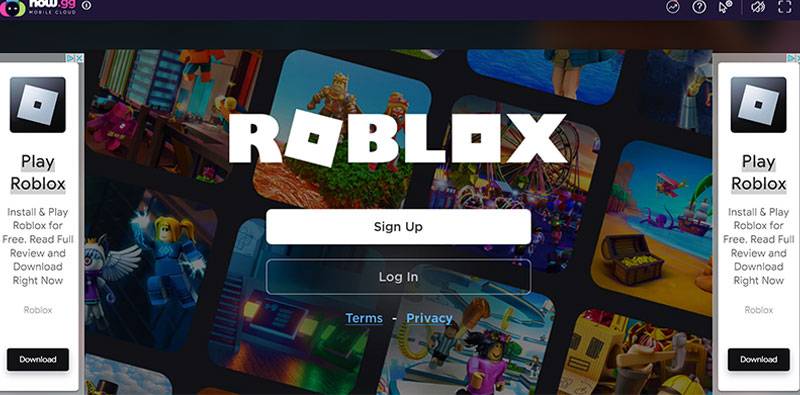
Key Features of Now.gg
- Instant Access: Start playing immediately without waiting for downloads or updates.
- Cross-Platform Compatibility: Play on any device with a web browser, whether it’s a smartphone, tablet, or desktop.
- Storage Efficiency: No need to download large files, freeing up space on your device.
How to Play Roblox Unblocked On Now gg?
If you’re ready to dive into Roblox but are concerned about your device’s capabilities or storage space, follow these steps to play via Now.gg:
- Access the Platform: Go to Now.gg in your browser and search for Roblox.
- Select Play in Browser: Click the pink “Play in Browser” button on the Roblox page.
- Complete Advert Viewing: Wait for the pre-roll ad to finish (click “Skip Now” when available).
- Log In: Enter your Roblox account details. Your account, friends list, inventory, and Robux all carry over exactly as they are on the main platform.
- Create a now.gg Account (Optional): This isn’t required to play, but it saves you from re-entering your Roblox credentials every visit and keeps your session active between visits.
- Start Playing: Enjoy all your favorite Roblox games!
Benefits of Using Now.gg for Roblox
- Saves Storage Space: No downloads mean more available storage on your device.
- Enhanced Graphics: Experience better graphics even on older devices thanks to cloud processing.
- Lag-Free Gaming: Reduced lag ensures smooth gameplay, provided your internet connection is stable (aim for at least 15 Mbps and under 50ms ping for the best experience).
Other Way to Play Roblox Online
While Now.gg is a fantastic option for playing Roblox without the need for downloads, there are other methods available:
- Mobile Apps: Download Roblox from the iOS App Store or Google Play Store.
- Microsoft Store: Access Roblox through Windows devices by downloading it from the Microsoft Store.
- Other Cloud Platforms: Services like EasyFun.gg also offer browser-based Roblox streaming, though free tiers on these alternatives often come with queue times during peak hours.
For most players on a reasonably modern device, downloading Roblox directly is still the smoothest experience — no ads, no queues, no compression. Cloud streaming through now.gg makes the most sense when you genuinely can’t install software, like on a locked-down school or work device.
Steps for Traditional Installation:
- Visit the Roblox Website: Choose your preferred platform.
- Create Your Account: An active email is required for parental controls.
- Customize Your Avatar: Click on Avatar to personalize your character.
- Select a Game: Click Home and choose a game to start playing!
Tips for an Optimal Gaming Experience
- Stable Internet Connection: Ensure you have a reliable internet connection to minimize lag — a wired connection will noticeably reduce input delay over WiFi if you’re streaming.
- Take Regular Breaks: Prevent eye strain and fatigue by stepping away periodically.
- Utilize Parental Controls: Manage your child’s gaming experience effectively with built-in controls.
- Disable Conflicting Extensions: Ad blockers and VPN extensions can interfere with the cloud stream loading properly — turn these off if now.gg won’t load.
A Note on School Networks
If you’re trying to play on a school Chromebook, know that many school IT networks have caught up with cloud gaming workarounds over the past couple of years. Now.gg routes traffic over standard HTTPS, which used to let it slip past filters aimed specifically at the Roblox app, but a growing number of schools now block cloud gaming and streaming categories directly. Results vary a lot from school to school. If your network blocks it outright, that’s a deliberate policy choice on the school’s end, not a bug — check with your IT department about approved options rather than trying to work around it.
FAQs
How can I play Roblox without installing it?
The best way is through Now.gg; simply visit their site, search for Roblox, and click “Play in Browser” for instant access. No account or download is required to start, though creating a free now.gg account makes future sessions faster.
Is Roblox suitable for younger children?
Roblox’s platform-wide ESRB rating is T for Teen (updated from its earlier E10+ rating in 2022), with a content descriptor for “Diverse Content: Discretion Advised” — a reflection of just how varied user-created experiences on the platform can be. Roblox has also begun rolling out experience-level ratings, so individual games can carry their own age guidance rather than relying solely on the platform-wide label. Many parents still allow younger kids to play with supervision, using Roblox’s built-in parental controls and chat filters, but it’s worth checking an experience’s individual rating rather than assuming the whole platform fits one age bracket.
Can I play Roblox on tablets?
Yes. Through now.gg, any tablet with a modern web browser works, regardless of OS version, since the game runs on now.gg’s servers rather than your device. If you’re installing the Roblox app directly instead, most current Android and iOS tablets support it without issue.
Conclusion
This guide aims to provide you with all the necessary information on how to enjoy Roblox online through Now.gg. Whether you’re looking to explore new games or create your own adventures, this platform opens up exciting possibilities without the hassle of downloads. With just an internet connection and a bit of creativity, you can dive into the expansive world of Roblox anytime, anywhere — just keep the current ESRB rating and school network caveats in mind depending on who’s playing and where.
Want free in-game rewards? Check our full list of working Roblox codes.