

Every organization has a document problem. There are training manuals sitting in shared drives that nobody reads, product guides buried in email attachments, and onboarding materials that new hires skim through without retaining. The content is valuable — it was carefully written by subject matter experts — but the format is wrong for how people actually consume information today.
Video solves this problem. People watch video. They watch it on their phones during commutes, at their desks during lunch breaks, and in bed before sleep. The challenge has always been the conversion: turning that carefully crafted document into a professional video without spending thousands of dollars or weeks of production time.
This guide explains how AI-powered document-to-video conversion works, when it makes sense to use it, and how to get the best results from the process.
Understanding Document-to-Video Conversion
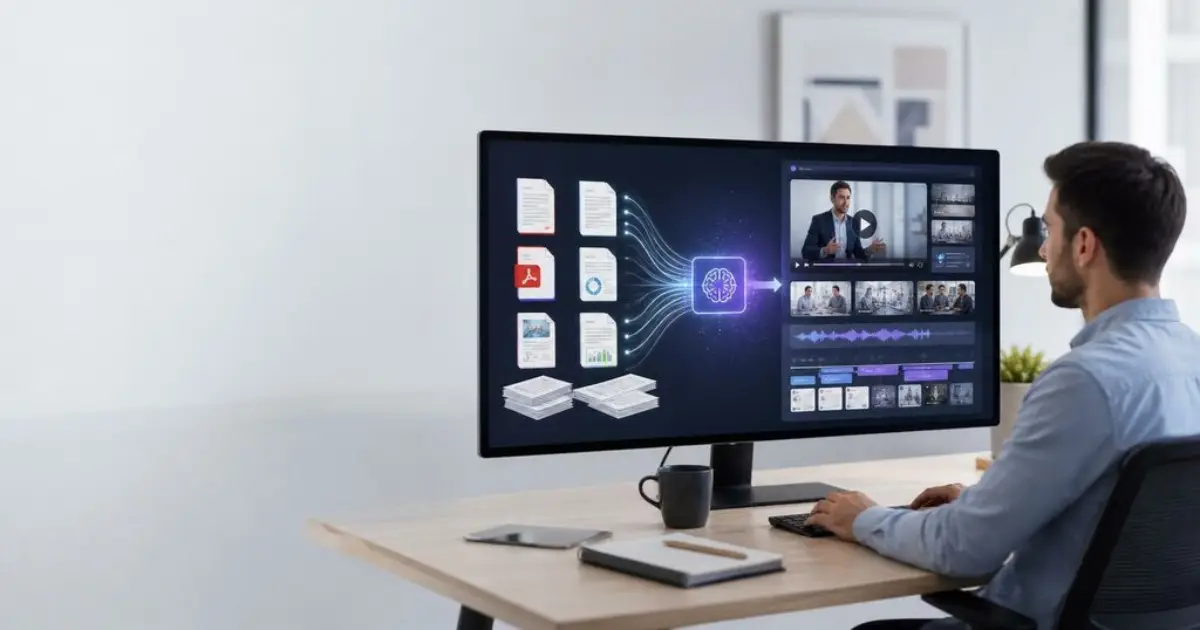
At its core, document-to-video conversion takes a static file — a Word document, a PDF report, a text file — and transforms it into a structured, narrated video with visual elements. The AI reads the content, identifies the logical structure, generates a script based on the source material, creates visual scenes for each section, and adds narration using AI voiceover technology.
The result is not a screen recording of someone scrolling through a document. It is a purpose-built video with a clear visual hierarchy, on-screen text highlights, supporting imagery, and a professional narration track. Think of it as having a skilled video editor and a professional narrator interpret your document for a video audience — except the entire process takes minutes rather than days.
What Types of Documents Work Best
Almost any text-based document can be converted, but some formats produce better results than others. Well-structured documents with clear headings, subheadings, and logical sections translate most effectively. Documents that follow a sequential or explanatory structure — step-by-step guides, procedural manuals, educational materials — tend to produce the most engaging videos because they have a natural narrative flow.
Documents that are highly data-dense, like financial spreadsheets or raw research data, may need some restructuring before conversion. The AI works best when it can identify the story within the data rather than trying to visualize rows of numbers.
Step-by-Step: Converting Your First Document
Prepare Your Document
Before uploading, take a few minutes to review your document structure. Add clear section headings if they do not already exist. Remove any content that is not essential to the video version — footnotes, reference lists, and appendices that work in a document format may not translate well to video. If your document is longer than 10 pages, consider breaking it into multiple shorter documents that each become a separate video.
Choose Your Platform
Several AI platforms now offer document-to-video conversion, but the capabilities vary significantly. For professional-quality output, look for a platform that supports multiple input formats (DOCX, PDF, TXT, PPTX), offers AI presenter avatars rather than just text-on-screen animation, provides script editing before final generation, and supports multilingual output.
A dedicated doc to video tool like the one from Leadde.ai handles the full conversion pipeline — from document upload to a finished video with AI narration and a digital presenter. It accepts Word, PDF, PowerPoint, and plain text files up to 200MB.
Upload and Configure
Upload your document and configure the output settings. Most platforms let you choose the narration language, the presentation tone (formal, conversational, educational), and the level of detail. If your document is comprehensive but you want a shorter video, selecting a “summary” detail level will instruct the AI to extract the key points rather than narrating every paragraph.
Review and Edit the Outline
The AI will analyze your document and produce a proposed video outline. This is the most important review step. Check that the AI has correctly identified your key points, that the section ordering makes sense for a video format, and that nothing critical has been omitted. You can typically add, remove, or reorder sections at this stage.
Select Your Visual Style
Choose a video template, an AI presenter, and an image source. Templates control the overall visual style — colors, fonts, layout patterns. The AI presenter will appear on screen delivering the narration. Image sources can include the platform’s built-in library, AI-generated images, or your own uploaded assets.
Generate and Refine
Generate the video and review the result. Most platforms allow you to edit individual scenes after generation — adjusting the script, swapping images, or modifying the layout. This scene-level editing is much faster than working with traditional video editing software because each scene is independently modifiable.
Use Cases Across Industries
Corporate Training and Onboarding
The average enterprise has hundreds of pages of training documentation that employees are expected to read during onboarding. Completion rates for text-based training materials hover around 20-30%. Converting these materials to video consistently pushes completion rates above 80%, while also improving knowledge retention and reducing time-to-productivity for new hires.
Document-to-video conversion is particularly valuable for compliance training, where organizations need to ensure that every employee has consumed specific content. Video with built-in tracking provides verifiable proof of completion that a shared PDF cannot.
Education and E-Learning
Educators often have extensive written materials — textbooks, lecture notes, study guides — that could serve as the foundation for supplementary video content. Converting these existing resources into video allows students to access the same information in a format that supports different learning styles and enables self-paced review.
Product Documentation and Customer Education
Software companies, in particular, struggle with the gap between comprehensive product documentation and actual user engagement with that documentation. Users do not read product manuals. They search for quick answers, watch tutorial videos, or contact support. Converting product documentation into short, focused video tutorials addresses user behavior while leveraging content that already exists.
Internal Communications
Company-wide memos, policy updates, and strategic plans often go unread when distributed as email attachments or intranet documents. Converting these communications into brief video formats significantly increases engagement. A 3-minute video summary of a quarterly strategy document is far more likely to be watched than a 15-page PDF is to be read.
Tips for Better Results
Write for Speaking, Not Reading
If you are creating a document specifically for video conversion, write it the way you would speak. Use shorter sentences, simpler vocabulary, and a conversational structure. Documents written in formal academic or legal language will produce awkward-sounding narration unless the AI is instructed to adapt the tone.
Structure for Visual Scenes
Think of each major section of your document as a separate visual scene. Each scene should convey one clear idea or concept. If a section tries to cover multiple unrelated points, the resulting video scene will feel unfocused. Break compound sections into smaller, single-idea segments.
Leverage Multilingual Capabilities
If your audience spans multiple languages, generate translated versions of your video rather than creating separate documents for each language. AI translation has reached a quality level where the output is suitable for professional use in most business contexts, and generating a translated version typically takes only a few minutes.
Measuring Impact
After converting documents to video, track these metrics to assess the impact: completion rates (percentage of viewers who watch the entire video), engagement patterns (where viewers pause, rewind, or skip), knowledge retention (if applicable, through assessments), and time savings (reduced support tickets or training inquiries that indicate viewers understood the content).
The organizations seeing the best results treat document-to-video conversion not as a one-time project but as an ongoing process. As documents are updated, the corresponding videos are regenerated. As viewing data reveals engagement patterns, content is refined. Over time, the video library becomes a more effective communication channel than the original documents ever were.
Also read: Convert Now Your Word Documents to PDF!